The record is right. You checked it three times, an online validator agrees, and the mailbox you pointed rua= at has been empty for a week.
Most published lists of reasons for this are unordered, which is the one thing such a list must not be. The checks have a natural sequence — each one makes the next meaningful — and doing them out of order means proving the same thing twice while the actual cause sits further down. Here is the sequence. Two questions come before it, because for a good share of readers the answer is that nothing is broken.
Two questions that may end this early
Has it been 48 hours?
Aggregate reports are not emitted as mail flows. Each report covers a reporting period, and RFC 9990 (§3.1.1.4) says the period will typically be a single UTC day beginning at 00:00 UTC. Generation and delivery happen after the period closes.
So if you published at 16:00 on Tuesday, the first period that includes your record ends at 00:00 UTC on Wednesday, and the report is built and sent some time after that. Twenty-four to forty-eight hours is the normal wait, and large receivers vary within it.
Two things stretch that window:
- DNS caching. If the name
_dmarc.example.compreviously did not exist, resolvers cached its absence, not just its contents. Negative caching (RFC 2308) uses a lifetime derived from the zone’s SOA record, and a receiver that looked an hour before you published will not look again until it expires. Check your SOA minimum before assuming something is wrong. - You cannot ask for faster. The
ri=tag used to request a shorter reporting interval. RFC 9989 removed it (Appendix C.5.2), and the IANA registry now listsrias historic. Publishingri=3600changes nothing — it is an unknown tag, and unknown tags are ignored.
Does the domain actually send mail?
A receiver learns that you want reports only when it looks up your policy, and it looks up your policy only when it has received a message with your domain in From: (RFC 9990 §3.4).
No mail, no lookup, no report. If the domain is parked, or serves only a website, or was registered last month and has not sent anything yet, silence is the correct outcome and no amount of DNS work will change it. A domain that sends a handful of messages a day is a softer version of the same thing: you will get reports only from the receivers that both saw your mail and run a reporting programme, so a thin week is not evidence of a broken record.
If you are past both of these, work down the list.
The six causes, in the order to check them
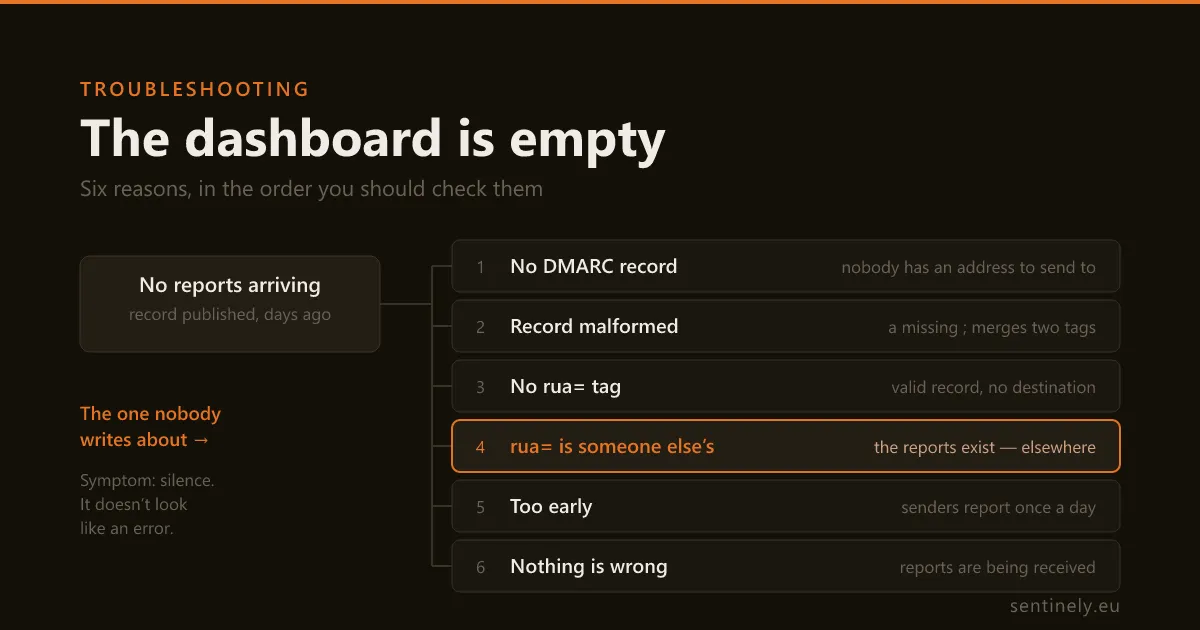
- There is no DMARC record where receivers look.
- The record is there, but receivers discard it — most often a missing semicolon.
- The record is valid and has no
rua=tag, or has one that is not a usable URI. - The
rua=is valid and is not yours — the reports exist, and go elsewhere. - It is too early — covered above.
- They are arriving — and the problem is downstream.
One command settles the first four:
dig +short TXT _dmarc.example.com1. No record where receivers look
Policy discovery starts at the name formed by prepending _dmarc to the domain in the From: header (RFC 9989 §4.10.1). Not the apex, not www, not a CNAME to your provider’s marketing page.
The failure that produces the most confusion is a DNS panel that appends the zone for you. You typed _dmarc.example.com into the name field, the panel appended .example.com, and the record now lives at _dmarc.example.com.example.com, where nobody will ever look. The dig above returns nothing and the panel shows a record that looks perfect. Trust dig, not the panel.
There is a subtler version. If the mail is sent from a subdomain — From: noreply@mail.example.com — discovery looks at _dmarc.mail.example.com first, and only if there is no valid record there does it walk up to the organizational domain (RFC 9989 §4.10). Both outcomes are normal. What matters for your empty dashboard is that in the second case, the record that applies is the parent’s, and the reports for that mail go to the parent’s rua. Come back to this if you are watching a subdomain.
2. The record is there and receivers discard it
Three ways a published record is thrown away before anyone reads your rua:
More than one record. If a query returns multiple DMARC policy records for the same name, all of them are discarded (RFC 9989 §4.10). This is the standard aftermath of a vendor migration: the old record was never deleted and the new one was added beside it. dig +short shows both. Two correct records are worse than one.
v= is not first, or is not exactly DMARC1. The version tag must come first, and its value is case-sensitive. If it is absent, not first, or spelled differently, the entire record must be ignored (RFC 9989 §4.7). v=dmarc1 is not a DMARC record.
A missing semicolon. This one deserves its own section, because it is invisible and because of how it fails.
One character: the missing semicolon
These two records differ by a single ;:
v=DMARC1; p=none rua=mailto:dmarc@example.comv=DMARC1; p=none; rua=mailto:dmarc@example.comAt a glance in a DNS panel they are indistinguishable. The first one gets you no reports at all, and here is the mechanism, because it is not what most people assume.
The grammar in RFC 9989 §4.8 defines a tag value as any printable character except the semicolon. A space qualifies. So does =. A receiver parsing the first record does not stop at the space: it reads the value of p as none rua=mailto:dmarc@example.com.
Two things are now true at once, and it is the second that hurts:
pholds a value that is notnone,quarantineorreject, so it is not valid;- there is no
ruatag in the record at all — it was swallowed into the value ofp.
RFC 9989 §4.10.1 treats an invalid p gently, but the leniency has a condition. If a rua tag is present with at least one syntactically valid URI, the receiver behaves as though the record said p=none and carries on — which keeps reporting alive. Otherwise it “applies no DMARC processing to this message.”
The missing semicolon deletes exactly the tag that would have rescued it. That is why this typo is silent rather than noisy: it does not weaken your policy, it removes your reporting.
The same shape of error, less common, is a record whose tags are in the wrong order — p=none; v=DMARC1; rua=… — which fails on the version rule above.
And the reassuring counterpart, so you do not spend an afternoon on the wrong thing: a stray fragment that is not a tag=value pair is not fatal. RFC 9989 §4.8 says syntax errors in the rest of the record are discarded in favour of defaults or ignored outright. Untidy, worth cleaning, not the reason your dashboard is empty.
3. No usable rua=
The tag is optional in the standard, and its absence is unambiguous: with no rua, receivers must not generate aggregate reports for the domain (RFC 9989 §4.7). A record can be perfectly valid, enforce p=reject, and tell you nothing.
Three ways the tag is present but unusable:
- An address instead of a URI.
rua=dmarc@example.comis not a DMARC reporting URI — a URI needs a scheme. It must berua=mailto:dmarc@example.com. The omission is easy to make and hard to see, because an address without a scheme looks completely reasonable to a human reader. https:only. Receivers are required to supportmailto:; support for anything else is optional, and URIs in schemes a receiver does not support must be ignored (RFC 9989 §4.7). An HTTPS-onlyruais a bet on each receiver.- The old size limit. The
!10msuffix is now obsolete syntax that reporters are told to ignore (RFC 9989 §4.8). Harmless if it is already there; pointless to add.
4. The rua= is valid, and it is not yours
This is the cause that survives every check above, and the one almost nobody looks for.
A syntax validator will confirm that rua=mailto:dmarc@reports.vendor.example is a well-formed reporting URI, because it is. What no validator can know is whether that address is yours. Only you know that. So the record passes every test, the tool you are paying for stays empty, and nothing anywhere reports an error — because from the protocol’s point of view nothing is wrong. The reports are being generated, on schedule, every day. They are going somewhere else.
Where the other address usually comes from:
- a previous DMARC vendor, after the subscription lapsed — cancelling a contract does not edit your DNS;
- the agency or MSP that configured the domain years ago, pointing at their own aggregation account;
- an internal mailbox on a mail system that has since been decommissioned.
The check is to read the list yourself rather than trust a green tick. Run the dig above and read the rua= value for what it is: a comma-separated list of destinations. Ask, for each entry, who receives mail at that address today? If you cannot answer for one of them, you have found it.
Two things worth knowing before you edit:
Being one of several is normal, so the fix is usually to add, not to replace. Every valid destination in the list gets its own copy; there is no primary. If you are moving between tools, run both for a week and compare, then remove the old one.
If you are watching a subdomain, check the parent too. Per the walk described in cause 1, mail from a subdomain with no _dmarc record of its own is covered by the organizational domain’s record — so its reports arrive at the parent’s rua while the subdomain’s dashboard stays empty. Nothing is misconfigured; you are reading the wrong shelf.
Two causes that are not in the record at all
The destination is on another domain and has not agreed to it
If the rua address sits under a different organizational domain from the one publishing the policy, receivers must confirm that the destination consented before sending anything (RFC 9990 §4). The reason is obvious once stated: without it, anyone could publish a record aiming a flood of reports at a victim.
The check is a DNS lookup the receiver performs. It takes the host from your rua URI, prepends _report._dmarc, and prepends the domain the policy came from. So a policy at example.com asking for rua=mailto:dmarc@reports.example.net produces a TXT query for
example.com._report._dmarc.reports.example.netand the answer must parse as a DMARC record with v=DMARC1 first. If that record is missing, the URI must be ignored by the receiver generating the report (RFC 9990 §4). Silence again, with nothing broken anywhere you would think to look.
Three practical consequences:
- The record goes in the destination’s zone, not yours. If your reports go to a third-party service, it is their record to publish, and most publish a wildcard —
*._report._dmarc.<their domain>— which covers every customer at once. If your reports go to a mailbox on a second domain you own, nobody else is going to publish it for you. - Same organizational domain, no verification needed. A policy at
_dmarc.mail.example.comsending todmarc@example.comdoes not trigger this at all. - The destination has the last word. The confirming record may itself carry a
rua, which overrides the one in your policy, restricted to the same host (RFC 9990 §4). Rare, but it is another way reports legitimately end up somewhere you did not choose.
The mailbox is eating them
A report is an ordinary email with an attachment: an XML file that should be gzip-compressed, carried as application/gzip or text/xml, with a filename built as receiver!policy-domain!begin-timestamp!end-timestamp.xml.gz (RFC 9990 §3.5.2).
The subject line is fixed by the standard, which gives you something to search for:
Subject: Report Domain: example.com
    Submitter: mx.example.net
    Report-ID: 1755820800-example.com@example.net
Search the entire mailbox — spam, quarantine and archive included — for Report Domain:. If messages turn up, everything above is fine and your problem is downstream. If nothing turns up anywhere, the earlier causes are still in play.
What eats them, in rough order of frequency: attachment policies that strip or block compressed files; a rule that files them somewhere nobody looks; a shared mailbox whose quarantine nobody reviews; and an rua address that does not actually accept mail, which produces bounces you never see because they go to the receiver, not to you.
One detail that saves an argument with your mail team: report traffic is itself DMARC-authenticated — RFC 9990 §3.5.2 requires these streams to produce an aligned pass. When reports land in quarantine, that is a local filtering decision, not an authentication failure.
They arrive, and the dashboard is still empty
If you found the messages, the remaining causes are all downstream of delivery.
You are looking at the wrong domain. A separate report is generated for each policy domain encountered in the period (RFC 9990 §3.1). Open one of the XML files and read policy_published/domain: that is the shelf the data was filed under. If it says example.com and you are looking at mail.example.com, see cause 4.
Duplicates were removed, correctly. When a generator re-sends a report it must reuse the original filename, and the Report-ID exists so consumers can recognise and ignore duplicates (RFC 9990 §3.5.2). A report that arrived twice appearing once is the system working.
Ingest is on a schedule. Reports are fetched and parsed in batches, not the instant they land. If the first one arrived twenty minutes ago, give it an hour before opening a ticket.
While you wait for a first report, you do not have to wait to learn anything. A report summarises a day of mail; a single message’s headers tell you what one receiver concluded about one message, right now. If you can send yourself a test message, paste its headers into our email header analyzer — it reads the receiver’s own declarations, needs no account, and keeps nothing.
And once the reports do arrive, the thing worth watching is not only that your record still parses, but that its rua still names you. That check is what Sentinely does continuously, which is the difference between finding out today and finding out at the next audit.