You don't know who sends as you
Spoofing runs silent, and so does the form tool, the CRM or the agency nobody told you about. Every one of them is already in your reports, with its IP and its volume.
DMARC monitoring · deliverability · anti-spoofing
Publish one DNS record. From then on, mailbox providers worldwide send Sentinely the DMARC reports for your domain — who sent as you, from which IP, how many messages, whether authentication passed. Sentinely reads them and gives you the verdict.
| Source | Provider | Volume | Auth |
|---|---|---|---|
| 66.102.0.15 | Google Workspace | 8,940 | PASS |
| 168.245.10.20 | SendGrid | 2,310 | PASS |
| 193.42.33.8 | Unknown host | 604 | FAIL |
Sentinely watches the full stack of signals mailbox providers use to trust — or reject — your mail. MX and NS are watched too: not for the score, but so you know the day they change.
The problem
The reports that could tell you who sends as you, and whether they authenticate, arrive as raw XML. Almost nobody reads them, so three things quietly go wrong.
Spoofing runs silent, and so does the form tool, the CRM or the agency nobody told you about. Every one of them is already in your reports, with its IP and its volume.
A missing SPF include or a revoked DKIM key sends your real mail to spam. Since 2024 Google and Yahoo also require DMARC from anyone sending over 5,000 messages a day to their users.
Staying at p=none feels safe, but it leaves the door open. Moving to reject without knowing every legitimate sender is a gamble — so most domains never move.
What you get
Sentinely turns raw aggregate reports into decisions: a score to track, sources you can name, records you can fix, changes you'd otherwise miss, and alerts that reach you before anyone else notices.
A 0–100 score with an A–F grade per domain, built from authentication, policy, hygiene and blocklist status — with a confidence indicator while the data is still thin.
IP, hostname (rDNS/PTR), geolocation and organisation/ASN for each source, plus a clear line between senders you've seen before and ones that have never sent for you.
SPF, DKIM, DMARC, BIMI, MTA-STS and TLS-RPT checked for how they're written: fused DMARC tags, rua without mailto:, unknown SPF mechanisms, the 10-lookup limit. With the exact record to publish.
Every analysis run compares your DNS with the previous observation and records what moved — the value before, the value after, and when. A DMARC policy walked back to p=none, an SPF include that disappeared, an MX pointing somewhere new: each one raises an alert.
DNS offers no way to list a domain's DKIM selectors, so most tools leave you typing them from memory. Sentinely collects the ones that appear in your DMARC reports and proposes them; you confirm yours with a click. Partial by construction — many senders omit the selector — and far better than a blank field.
The number of IPv4 addresses your record lets send as you, next to how many of them did in the last 90 days. The quickest way to see the surface a forgotten include leaves open — and a floor, not a total, since it counts the addresses written literally in the record.
Continuous DNSBL/RBL checks on the IPs sending for your domain, with a three-state result — listed, clean, or not checkable — so uncertainty never reads as safety.
A new source, a volume anomaly against the 7-day average, a high failure rate, mail quarantined or rejected, a record that changed. Plus one digest per person — every domain you watch in a single email, worst first — daily, weekly or both, in each recipient's language.
A separate space per client with per-domain access, your name, colour, logo and footer on the app, emails and PDFs, and a read-only REST API with a per-tenant key.
How it works
No agents, no gateway changes, no mail rerouting. You publish a single DMARC record and Sentinely does the reading.
Add one DMARC record pointing aggregate reports at a Sentinely address. That's the only change on your side — or push the reports yourself over a signed HTTP webhook.
XML, GZIP and ZIP parsed and de-duplicated. Every source resolved to an IP, host, location and organisation, then checked for authentication, alignment and blocklist status. Each run also compares your DNS with the previous observation, so a changed record doesn't pass unnoticed.
Fix what's weak with the record we hand you, keep your campaigns authenticated, and move from p=none to enforcement with the data to back the decision.
Configuration monitoring
The configuration you set up rarely stays as you left it: a client, a technician or the registrar changes something, and nobody notices. Every analysis run compares your DNS with the previous observation and records the difference — the value before, the value after, the day it moved.
Where your mail is delivered, and who controls your zone. An MX that moves from Microsoft 365 to an unknown host either breaks your incoming mail or means someone reached your DNS — so both records are tracked and land in the same timeline. Neither touches your score: this is monitoring, not a grade.
DNS gives no way to list the selectors published for a domain, so anyone who doesn't already know them is analysing blind. Sentinely collects the selectors that appear in your DMARC reports and proposes them; you confirm yours with a click. The inventory is partial — plenty of senders leave the selector out — and we'd rather say so than call it complete.
One line tells you how many addresses your record authorises to send as you, and how many of them actually did. The gap is the surface a forgotten include leaves behind — and you don't need to know what SPF is to read it.
No DNS query can recover what a record said last month, and we won't pretend otherwise. The timeline begins when the domain is added; from that point on, nothing changes without being written down.
SPF surface
428,216IPv4 addresses authorised to send as acme.com
14of them sent mail in the last 90 days
The digest
One email per person, not one per domain: everything you watch in a single message, worst first. What changed in your configuration, the grade, sources that landed on a blocklist, and a warning if the reports stopped arriving. Daily, weekly or both — the recipient chooses, in their own language.
AI Insights — Claude explaining why something happened, not just the numbers — is an optional add-on on every paid plan, and switched on throughout the 30-day trial.
Domains, worst first
AI Insight
A new source, 193.42.33.8, sent 604 messages as acme.com and failed both SPF and DKIM. It's listed on one blocklist and matches none of your known senders — this looks like spoofing, not lost legitimate mail. No action needed on your side; keeping DMARC at p=reject ensures these are rejected.
Pricing
Annual billing is ten monthly instalments — two months free. Prices in EUR, excluding VAT.
Two ways to start. Both cost nothing, neither asks for a card.
€0forever
One domain, monitored for good. A real plan with no end date — not a countdown.
€0for 30 days
A plan in its own right, not an extra bolted onto the paid ones. Every feature and add-on is switched on. When the 30 days are up you move to Free automatically: nothing is locked and your data stays readable.
€5/mo
Paying monthly: €60 a year — annual: €50.
€50/yr
Ten instalments of €5 — two months free.
One domain, taken all the way to enforcement.
Choose Starter S€18/mo
Paying monthly: €216 a year — annual: €180.
€180/yr
Ten instalments of €18 — two months free.
A handful of domains and the team around them.
Choose Starter M€50/mo
Paying monthly: €600 a year — annual: €500.
€500/yr
Ten instalments of €50 — two months free.
Enough domains to be somebody's day job.
Choose Starter L€200/mo
Paying monthly: €2,400 a year — annual: €2,000.
€2,000/yr
Ten instalments of €200 — two months free.
Many clients, your brand on all of it.
Choose BusinessPrices in EUR, excluding VAT. Payment is handled by Stripe or PayPal. AI Insights is an optional add-on on every paid plan by design — it isn't bundled into any of them. Need more than 100 domains? Talk to us.
The same catalogue the application bills from.
| Plan | Monthly | Annual | Domains | Users | History | Messages / month | AI Insights | White-label |
|---|---|---|---|---|---|---|---|---|
| Free | €0 | €0 | 1 | 1 | 30 days | 1,000 | — | — |
| Trial · 30 days | €0 | — | 3 | 3 | 30 days | 10,000 | Included | Included |
| Starter S | €5 | €50 | 1 | 3 | 30 days | 10,000 | +€4/mo | — |
| Starter M | €18 | €180 | 5 | 10 | 60 days | 25,000 | +€7/mo | — |
| Starter L | €50 | €500 | 25 | 50 | 180 days | 100,000 | +€25/mo | +€12.50/mo |
| Business | €200 | €2,000 | 100 | Unlimited | 180 days | Unlimited | +€100/mo | Included |
White-label is included in Business, and available as an add-on on Starter L for €12.50/mo.
FAQ
No. Sentinely translates raw aggregate reports into plain-language verdicts and tells you exactly which record to publish. If you can edit a DNS entry, you're set.
No. Sentinely only receives the DMARC reports you route to it. It never publishes or edits your DNS records: it works out the exact record you need and shows it to you — publishing stays with you.
They are two separate plans, and both cost nothing. Free is perpetual: one domain, one user, 1,000 messages a month, 30 days of history, no end date. Trial is a plan in its own right lasting 30 days — three domains, three users, 10,000 messages a month, with every feature and add-on switched on, AI Insights and white-label included. Neither asks for a card. When the trial's 30 days are up you move to Free automatically; nothing is locked and your data stays readable.
As soon as your RUA points at us, reports start flowing. Mailbox providers send aggregate reports roughly once a day, so most domains get their first full verdict and digest within 24 hours.
Yes — from the day you add the domain. Every analysis run compares your DNS with the previous observation and records the difference: the value before, the value after, when it moved, with an alert. That covers SPF, DKIM, DMARC, BIMI, MTA-STS and TLS-RPT, and also MX and NS — where your mail is delivered and who controls your zone — though those two are monitoring only and don't affect the score. What we can't do is reconstruct the past: no DNS query can tell you what a record said last month, so the timeline starts when the monitoring does.
It helps, but no. DNS provides no way to list the selectors published for a domain, so if you don't know them there's nowhere to look them up. Sentinely collects the selectors that appear in your DMARC reports and proposes them; you confirm the ones that are yours with a click. The inventory is partial by construction — many systems that send reports omit the selector — so you can still add by hand any you know about.
No — aggregate reports only. That means Sentinely never holds copies of individual messages: it works from the counts, sources and authentication results that providers report in aggregate.
Yes. Sentinely has been multi-tenant since day one: separate spaces per client, per-domain access assignable to individual users, white-label branding across the app, emails and PDFs, and a read-only REST API with a per-tenant key.
It isn't a mail gateway — it doesn't route, filter or block mail, and it doesn't replace your SEG or anti-spam. It doesn't do inbox-placement testing, seed lists or spam-trap monitoring, and it doesn't validate BIMI VMC certificates. There's no SSO/SAML, and white-label doesn't put the application on your own domain. The score reads the DMARC data you receive — it isn't a guarantee of inbox delivery.
DMARC report data is processed and stored in the EU and retained on a rolling window — see our GDPR/DPA page for the specifics. The interface, alerts, daily digest and AI Insights are all available in both English and Italian.
From the blog
Notes on DMARC, email authentication and keeping domains safe from spoofing.
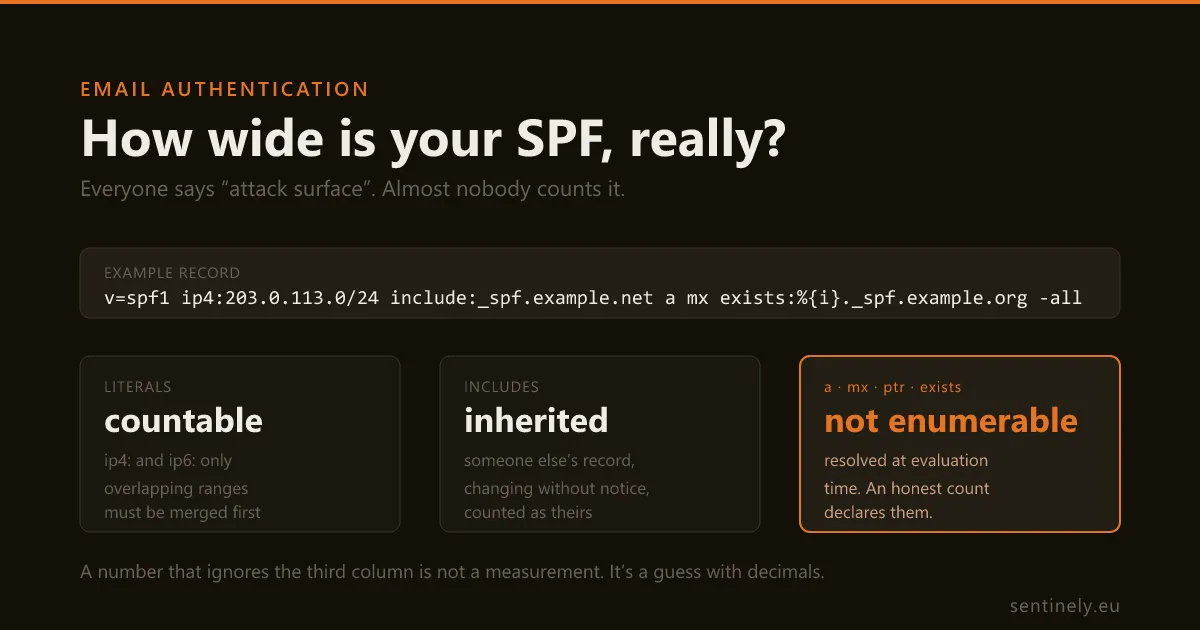
Every guide says a broad SPF record widens your attack surface. Almost none of them says by how much, and the arithmetic is harder than adding up the ip4 ranges. Here are the four ways a naive count lies — worked on real ESP records, resolved and counted rather than remembered.
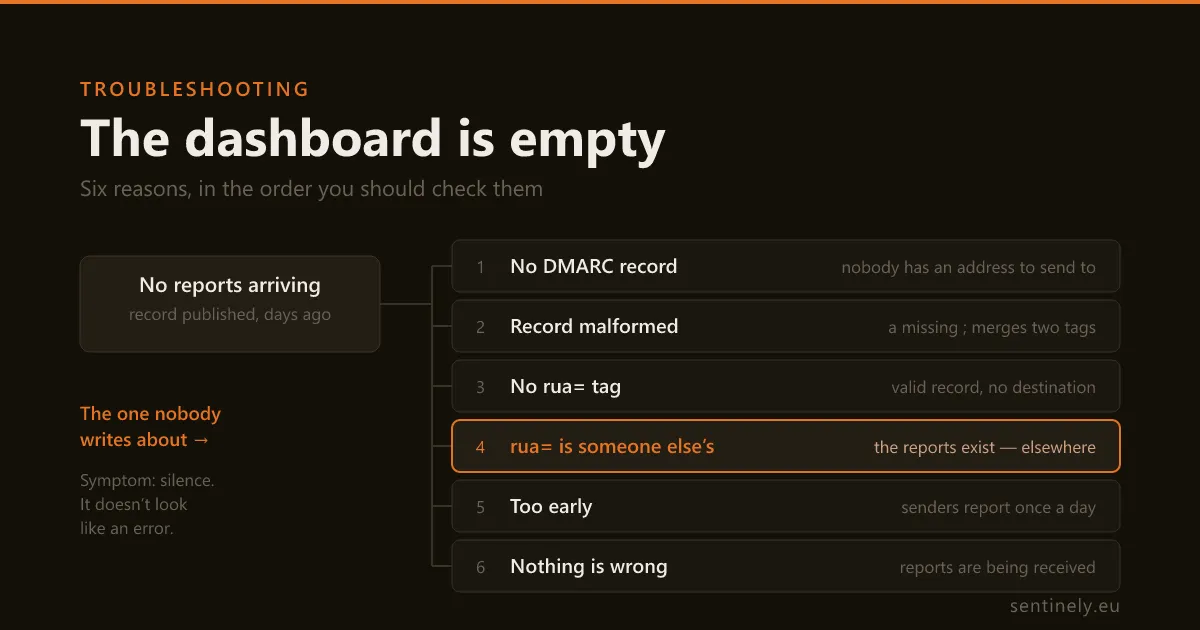
You published the record, you pointed rua= at a mailbox, and a week later there is still nothing to read. The checks that find the cause have a natural order, and most published lists give them in no order at all. Here is the sequence — including the cause almost nobody mentions: the reports exist, and they are going to someone else.
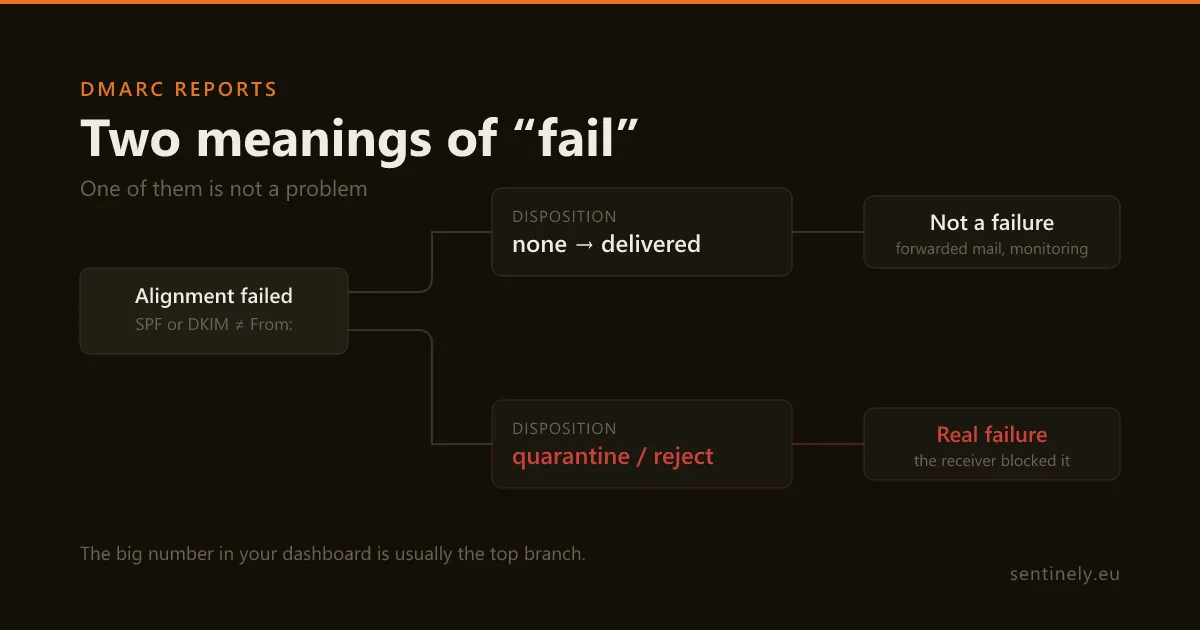
Your first DMARC dashboard shows a wall of "fail" and the obvious question is whether someone is forging your domain. Usually not: "fail" in an aggregate report means two different things, and the alarming one is much rarer than the harmless one. Here is the rule that separates them, applied to real report rows.
Publish one DNS record and your first verdict arrives within a day. The 30-day trial has everything switched on — no card.